
Well guys, the time has finally come, as we’ve gotten some pretty crazy Android 17 news here. Indeed, it’s long overdue. I feel like in prior years, we got leaks way earlier and way more often. But hey, maybe things have changed in Google’s world. Who knows? What we do know is that a wild leak has surfaced over the past day or so. And I want to break it down so you know exactly what to expect in the near future. And of course, if you appreciate Android coverage like this, please stick around and visit the Techguider.in website because we love writing tech blogs.
System UI Changes
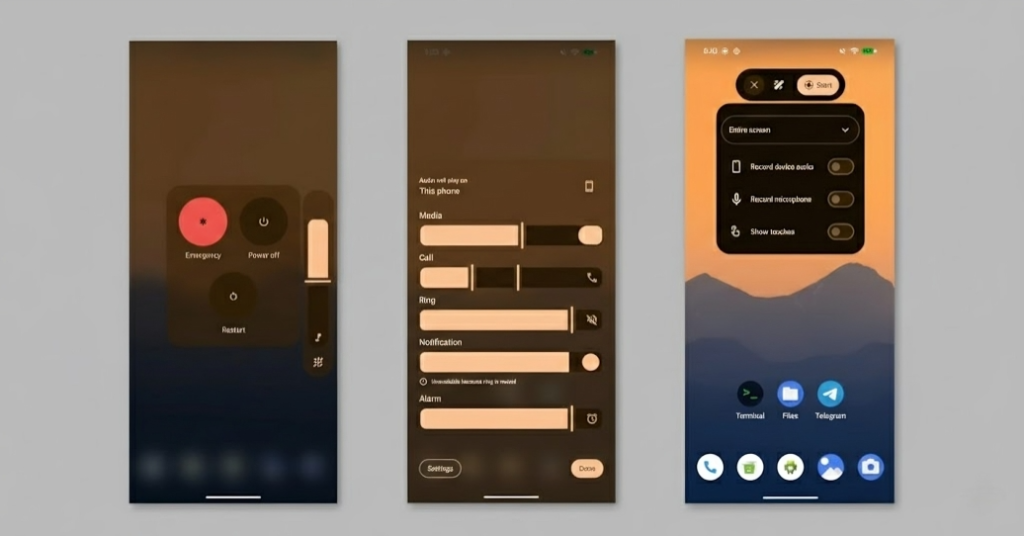
Specifically, some new features and changes to the whole user experience. These screenshots show the first thing people are paying the most attention to, which is new blur effects for the system UI elements sprinkled all throughout the OS. In these images, we see the volume slider, volume panel, and volume menu all showing this noticeable blur with dynamic color theming attached. Right now, if you check these items on a Pixel running stable software, they’re just solid colors again with dynamic theming, which I have to say both options do look great. I just hope that there’s a choice to toggle or switch between the two, as it feels like this is more of a stylistic choice or perhaps they’re just cleaning up the expressive blur effects that didn’t make the cut from its last update.
Screen Recording
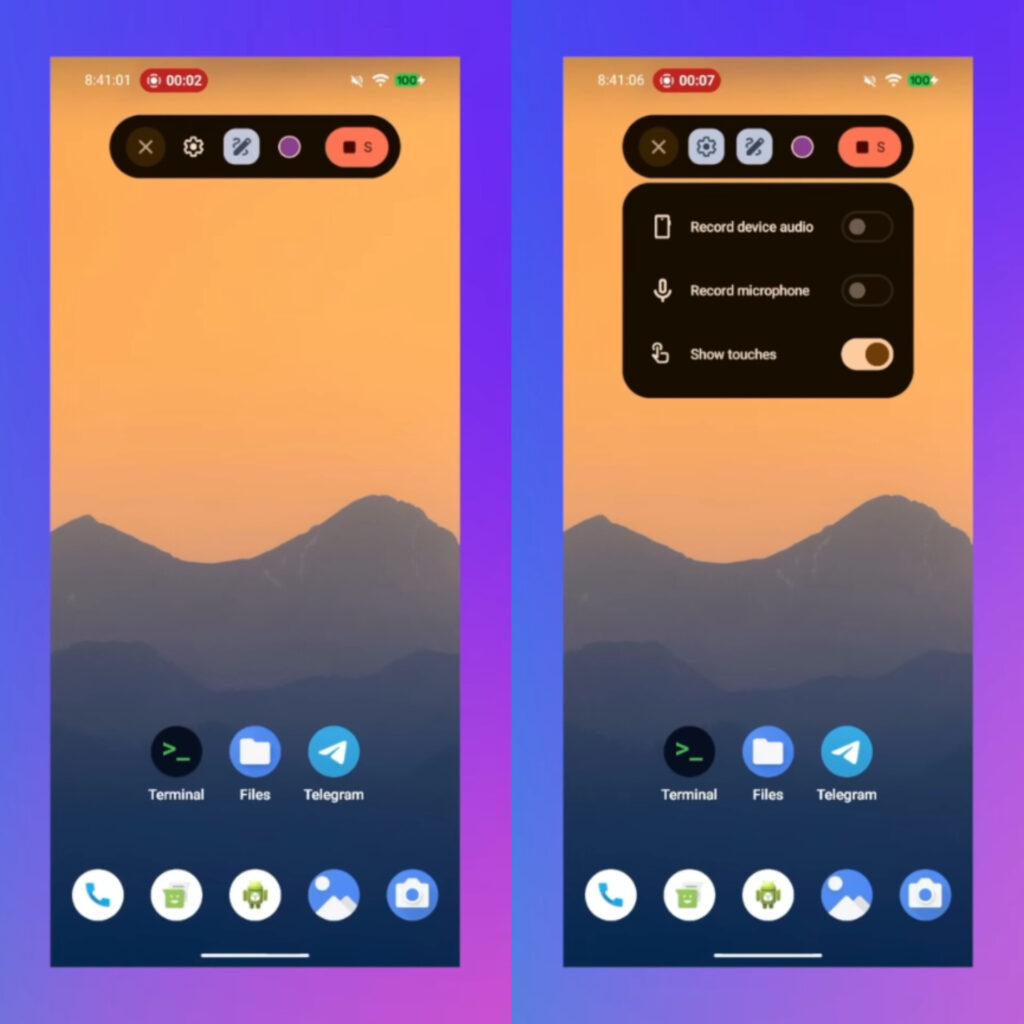
Thankfully, we also got some screen recordings that show us a handful of new additions, specifically a much-needed overhaul to the screen recording tool. The main idea here with this change is to be focused around ease of use. Take a moment to review these screen recordings. It looks much easier to engage with these screen recording options. Something big here is that it appears this whole screen recording system uses a floating pill to access your controls. Upon your initial recording, you have the option to select recording options like recording device audio, microphone, and showing touch interactions. When you’re recording, this pill does hide away inside the status bar. And you can tap that little chip in the corner in order to bring it back. And to be clear, none of these interactions will show in the final recording. Lastly, you might have noticed a little markup icon inside that screen recording overlay. We don’t have direct footage of this yet, but it is safe to assume you can use the markup tools inside of your screen recording.
Split Notifications & Quick Settings
As we can see, we’re just getting some UI elements switched around and a little bit more blur, and it’s honestly nothing really to call home about. But I did want to mention another prominent feature spotted by leaks on Telegram, which is the addition of the split view notification shade, just like we see with iOS or OxygenOS, for example. With this feature, you can basically swipe down from the left for the notification shade or from the right for quick settings. The best part is it appears Google is keeping the classic style we have today as an option in the settings, which I think is absolutely awesome. Android is all about choice, and I think keeping it that way as opposed to making it a force for change will probably satisfy everyone.
App Lock & Bubble Windows
There’s more. In one clip, a user holds down on an app to open the submenu, revealing two new options, bubble and lock app. As the name implies, the lock app option should allow you to hide individual apps behind a password, pin code, or biometric lock. While the demo isn’t fully working yet, we can thankfully see the full setup flow, and it does look pretty standard, definitely a big feature Pixel users have been asking for for quite some time now. And the second option is called “bubble,” and I’m assuming this is the pop-up window feature that we’ve seen in all other Android skins. It should allow you to open and close apps from a quick access bubble you can drag around on your screen, giving pixels a much-needed utility.
Android 17 Release Timeline
With that said, my friends, all of this is hearsay until we see the update for ourselves. Obviously, none of us are actually running Android 17 on our devices. We haven’t heard much about the next beta. If I had to guess. It could be any week now. Based on the previous Android 16 cycle, we got the first developer preview around late November with a stable build in June. If that logic is still sound in 2026, the beta should be arriving hopefully very soon, possibly within the next few weeks. So, if you have a device specially set up for that, definitely throw it on a charger because you might be using it, hopefully, very soon. And that, my friends, is everything we know about Android 17. Rumored to have the code name Cinnamon Bun, which is actually kind of cute. Little Cinnamon Bun, Android 17 action over here. But, either way, guys, this is just a quick blog where we were able to just grab this breaking news, and I just wanted to cover it in a timely manner for you guys.