
A simple question: Where do you have your Gmail? Where is your Netflix Watchlist? How about that photo from 2019 that you can find in just a few seconds?
Not actually on your phone. All of that stuff is sitting in a data center somewhere, powered by computers you will never even see. That is what cloud computing is, and if you have ever watched a video online or used Google Docs, then you have used cloud computing.
In this manual, you will find out what cloud computing is, how it operates and which are the major forms of cloud computing; all expressed in simple language. There is no technical vocabulary nor do you require a degree in information technology.
So, What Is Cloud Computing?
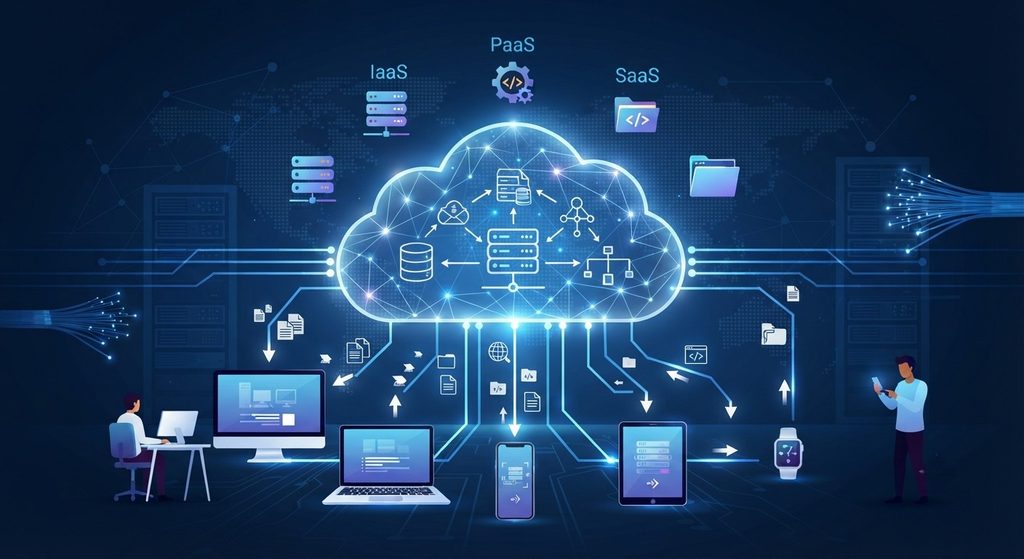
Using cloud computing allows you to access and use computer resources (processing power, data storage, and applications) through the Internet rather than purchasing and managing your own hardware.
Think about how you get electricity. When you want to use electricity, you do not create a power plant next door to your house. Instead, you connect to the electric company’s grid, draw out the amount of electricity that you require, and then pay for that portion of electricity that you consumed. Cloud computing operates in a similar fashion as electricity; however, cloud computing uses servers rather than watts.
The “cloud” does not float above us. The “cloud” is a collection of data centers that are owned and operated by large organizations such as Amazon, Microsoft, and Google. We call it “the cloud” because it sounds much more pleasant than saying, “someone else’s computer.”
How Does Cloud Computing Work?
When you save a file to the cloud, here’s what happens:
- Your device sends the file over the internet.
- A data center receives it and stores it on its servers.
- Often times, multiple copies of your files will be stored in different locations, so if one computer fails, it does not mean that all of your data has been lost.
- When you want it back, any device with your login can pull it down.
This means that you can begin writing an email using your laptop, then complete the email using your cell phone. Neither of the two devices has “on” status; rather, each is a window to the same location.
This is not a new idea, of course. Amazon introduced Simple Storage Service (S3) and Elastic Compute Cloud (EC2) back in 2006. Today, those services are used to power a majority of applications and websites.
The 3 Main Types of Cloud Services
SaaS (Software as a Service) Order Fulfillment: It’s all handled. You just utilize it. For example, think about Gmail, Slack, Dropbox, or Zoom. When you sign-in, the vendor will handle everything else.
PaaS (Platform-as-a-Service) To buy a pizza kit: The kitchen is set up with all ingredients. All that is required is your creativity. Developers utilize PaaS so they may create and release applications without being concerned with managing their own server. Some examples of PaaS include Google App Engine and Azure App Service.
IaaS (Infrastructure as a Service) Renting a kitchen: You get the basic ingredients for cooking (raw computing power, storage, and networking), then you can make whatever you want from there. Some great examples include Amazon EC2 and Google Compute Engine. This type of service gives you the most flexibility, but it also requires the most knowledge of how things work.
Public, Private, and Hybrid Cloud
Where the cloud lives matters too:
- Public cloud: This is a shared infrastructure that is managed by an external provider such as Amazon Web Services (AWS), Microsoft Azure, or Google Cloud Platform (GCP). In most cases, this is the most cost effective way to access cloud services.
- Private cloud: Are used for the infrastructure of a single company. They tend to be more expensive than other types of cloud computing, however, they allow organizations to have greater control over their data, making them ideal for companies such as banks and government agencies.
- Hybrid Cloud: This is a combination of both. Private data remains private, while all other data runs on the public cloud.
Many businesses also utilize multicloud (multiple providers) so that they do not become dependent upon just one provider.
Why Everyone’s Moving to the Cloud
The upsides
- Lower upfront cost – No buying servers. You pay for what you use.
- Easy scaling – If your site has a sudden surge in traffic, you can easily increase its capacity within minutes and then decrease it.
- Access from anywhere – Work from your couch, a café, or another continent.
- Less maintenance – The provider handles updates, hardware, and security patches.
- Better backup – Your data will never be lost if your laptop falls into a lake.
The downsides (let’s be honest)
- You need internet – No connection, no access (unless you’ve set up offline mode).
- Cost of use may increase rapidly – “Pay-per-use” is a good model, but it will be problematical if you forget to turn off an item.
- The protection of the system is a collaborative effort – Your provider will provide security for their portion of the system, however, you have a responsibility to create strong passwords to protect your own part.
- Vendor lock-in – Moving everything to a new provider later can be a headache.
These are not deal-breakers. These mean cloud computing will be most successful for you if you enter the process with your eyes wide open.
Final Thoughts
The term “cloud computing” may sound like a lot of jargon, however the concept is quite basic; you can rent whatever you require via the internet rather than purchasing and managing everything on your own. This is why it is used to support so many different types of services including your favorite streaming apps to large international organizations.
As long as you are either a student, an independent worker (freelancer), or owner of a business; it will be beneficial to understand some basic concepts so that you can choose more effectively which tool to utilize and what to purchase.
Now, find something that you are using a single device for storage such as photos, or work files and move those items to a cloud service today. This should only take five minutes and you will be able to see the benefits of doing so when your laptop has problems again.
FAQs
What is cloud computing in simple terms?
Cloud computing means using servers, storage, and software over the internet instead of owning and maintaining them yourself. You pay for what you use, much like an electricity bill, and the provider handles the hardware behind the scenes.
Is cloud computing safe?
Generally, yes. Major providers invest heavily in security, but protection is shared. They secure the infrastructure, and you’re responsible for strong passwords, two-factor authentication, and sensible access settings. Most cloud problems come from user mistakes, not provider failures.
Who are the biggest cloud computing providers?
The three biggest are Amazon Web Services (AWS), Microsoft Azure, and Google Cloud. Others include IBM Cloud, Oracle Cloud, and Alibaba Cloud.
What are the main benefits of cloud computing?
The big ones are lower upfront costs, easy scaling, access from anywhere, automatic updates, and built-in backup. You skip buying hardware and let the provider handle maintenance.
What are the disadvantages of cloud computing?
The main drawbacks are dependence on internet access, costs that can creep up if you’re not watching usage, shared security responsibility, and vendor lock-in, which makes switching providers harder later.